Also available in: 日本語
This year I completely restructured my Obsidian workflow. Previously, I’d type notes, link them by hand and occasionally paste something into Claude to ask a question. It worked. But my notes often missed links, and the wiki never quite compounded the way I’d hoped.
After reading Andrej Karpathy’s tweets about treating your own notes as an LLM-maintained wiki, I got inspired to try the same thing on my own vault - and decided to give it a go. Now my workflow is different: I still decide what goes in and what matters, but AI does the boring work: routing new items, cross-linking them against existing pages, merging duplicates, promoting high-signal notes etc.
It’s kinda like AI assisted coding, but for knowledge work.
On a high level:
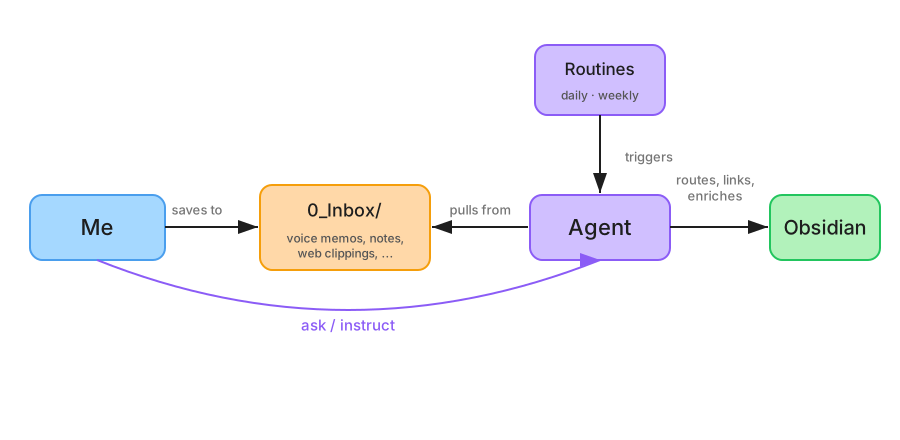
The workflow
Here’s what a typical week with the new workflow looks like: from capturing a quick thought to having the wiki maintain itself.
Capturing ideas
I often have ideas while I’m out. I open Zettel (a small app I built for quickly taking markdown notes) on my phone, type three sentences, and it drops a note into 0_Inbox/ - a staging folder where new notes land before getting sorted. That’s it, I’m done.
Overnight, a scheduled Claude Code Routine called process-inbox picks up my note, decides where it belongs in the vault, creates the page with proper metadata, and cross-links it against existing notes. Next morning, my three sentences have become a proper page linked to two project ideas I’d forgotten about.
Same thing for voice memos. I record something on my phone, a Shortcut transcribes it, and the transcript lands in the inbox. process-inbox turns it into a real note.
Previously that workflow meant sitting down, creating the file, writing the metadata header, manually searching for related notes, adding links between them - I just wouldn’t do it. Now the barrier is “type three sentences into a notes app.”
Keeping the wiki healthy
Notes rot: Pages drift into duplicates, topics grow without anyone noticing, cross-references go stale. Furthermore, the daily process-inbox skill may miss the bigger picture sometimes.
This is where the weekly routine called reconcile comes in. Every Sunday it reviews the last 7 days of changes and produces a report: these two pages on X are near-duplicates, want me to merge them? and this page on Y has been growing for a month - propose promoting it to canon.
This way my vault stays organized and notes don’t become stale.
Staying in the loop
Routines running overnight are only useful if they can tell me what they did, and flag the things they want me to decide.
Two files handle that:
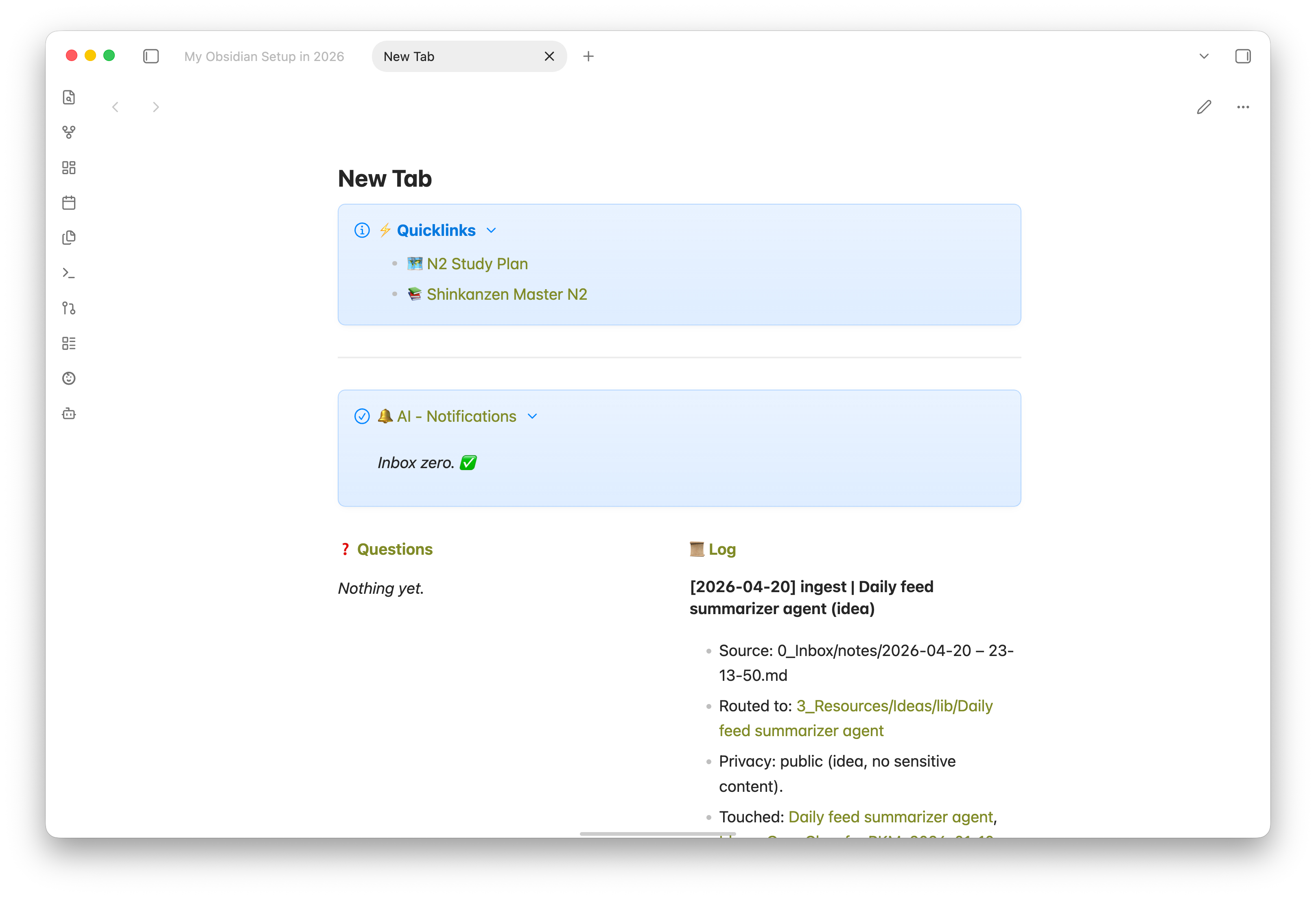
log.md(an append-only audit trail of what every run processed)notifications.md(basically my AI notification center)
I have log.md and notifications.md pinned as my Obsidian new tab page, so whenever I open the app I see exactly what the agent wants to surface:
Interactive work
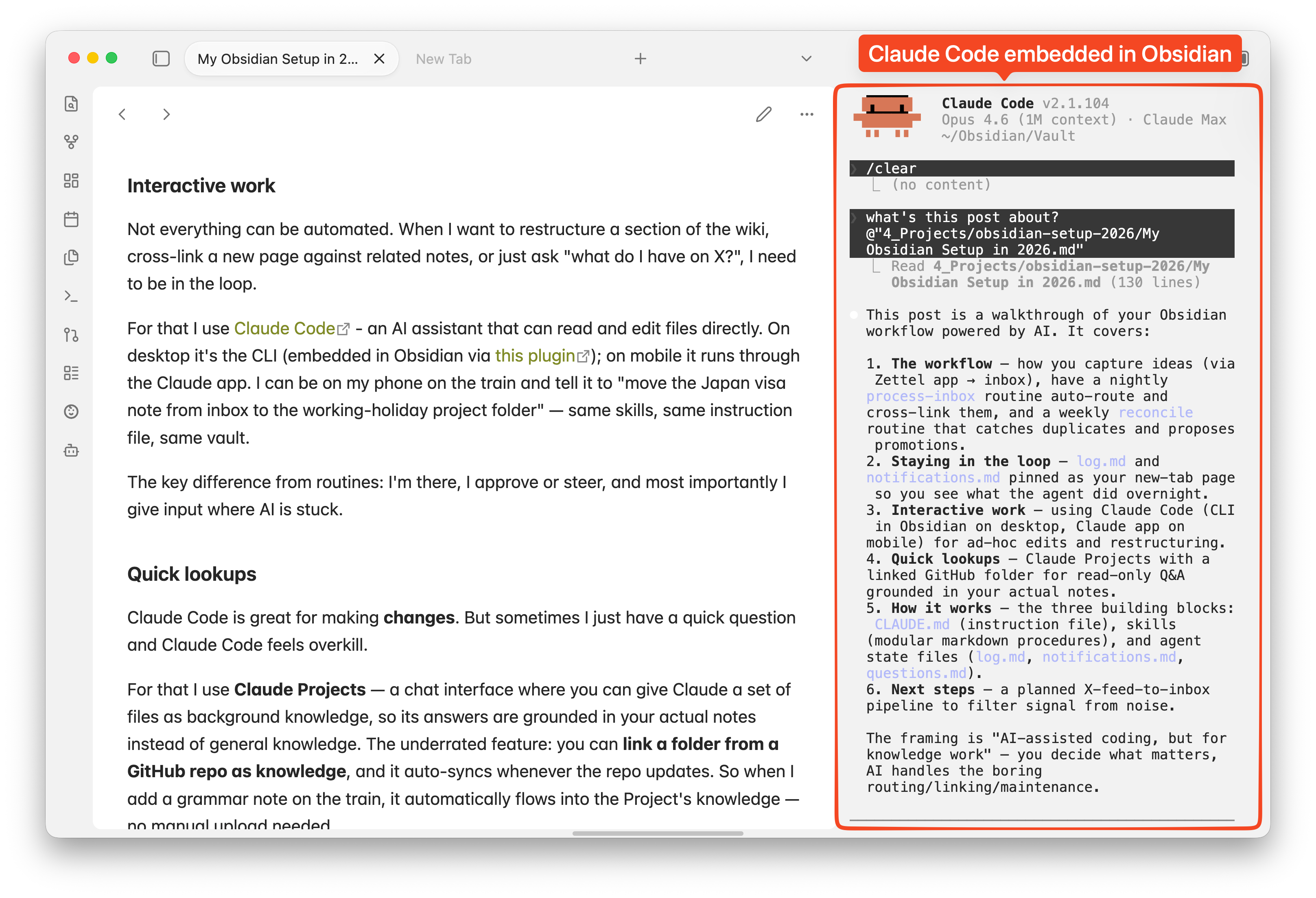
Not everything can be automated. When I want to restructure a section of the wiki, cross-link a new page against related notes, or just ask “what do I have on X?”, I need to be in the loop.
For that I use Claude Code - an AI assistant that can read and edit files directly. On desktop it’s the CLI (embedded in Obsidian via this plugin); on mobile it runs through the Claude app. I can be on my phone on the train and tell it to “move the Japan visa note from inbox to the working-holiday project folder” — same skills, same instruction file, same vault.
The key difference from routines: I’m there, I approve or steer, and most importantly I give input where AI is stuck.
Quick lookups
Claude Code is great for making changes. But sometimes I just have a quick question and Claude Code feels overkill.
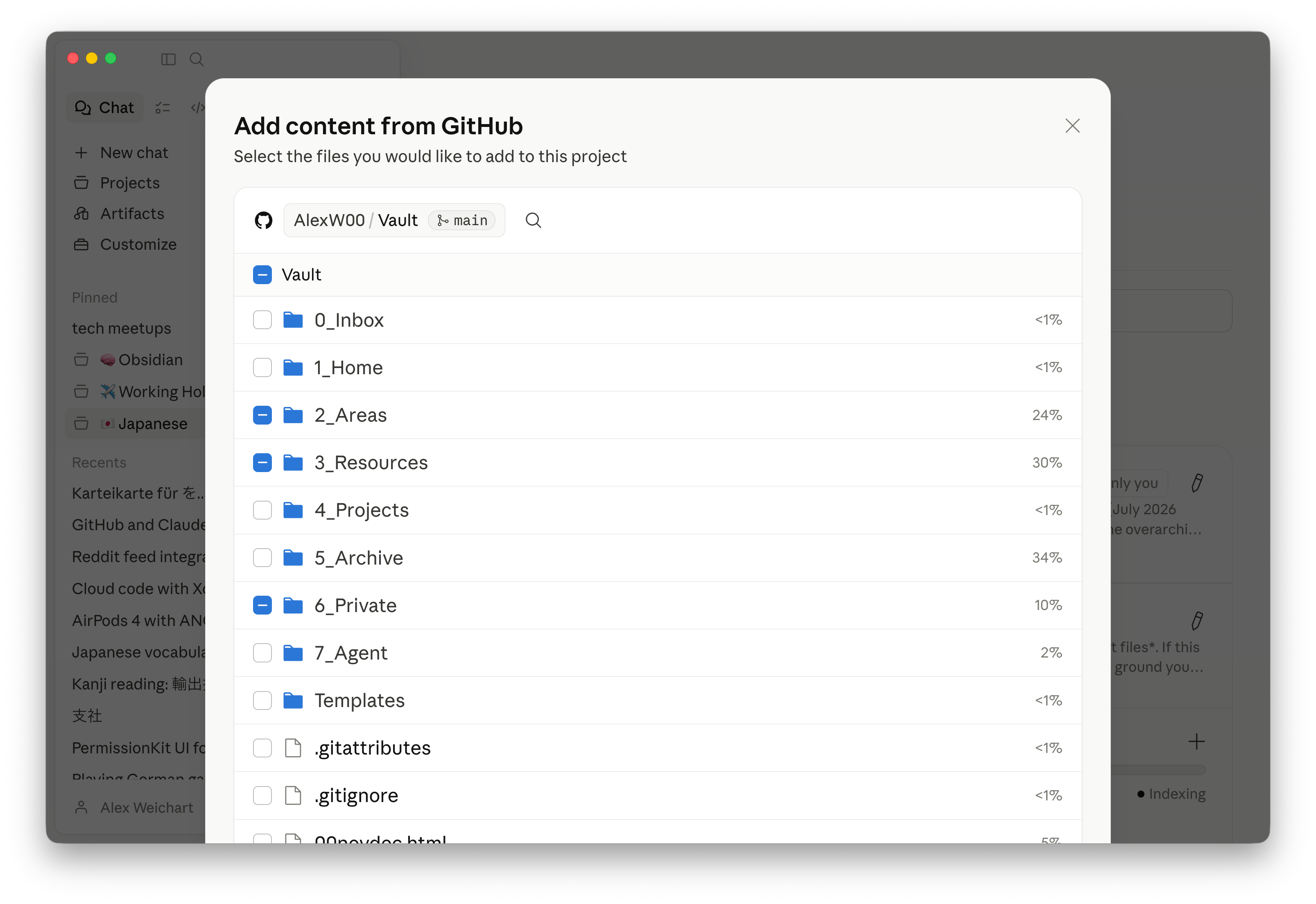
For that I use Claude Projects — a chat interface where you can give Claude a set of files as background knowledge, so its answers are grounded in your actual notes instead of general knowledge. The underrated feature: you can link a folder from a GitHub repo as knowledge, and it auto-syncs whenever the repo updates. So when I add a grammar note on the train, it automatically flows into the Project’s knowledge — no manual upload needed.
When I ask my Japanese Project “what was that grammar point I studied last week with the weird verb ending,” the answer is grounded in my actual notes. Fast, cheap, no file edits needed.
Adding files to a project can be easily done in the Claude UI:
Next steps
90% of my X feed is slop — rage bait, engagement farming, recycled takes. But 10% is genuinely interesting. The problem is I have to scroll through the noise to find the signal, and even when I do, it disappears into the timeline.
The idea: add a third routine that uses the X CLI to pull my home feed daily, have AI filter it down to the good stuff, and drop those items into 0_Inbox/. From there, process-inbox handles them like anything else.
Workflow - Summarized
Here’s the whole setup at a glance, and how I use different Claude features in it:
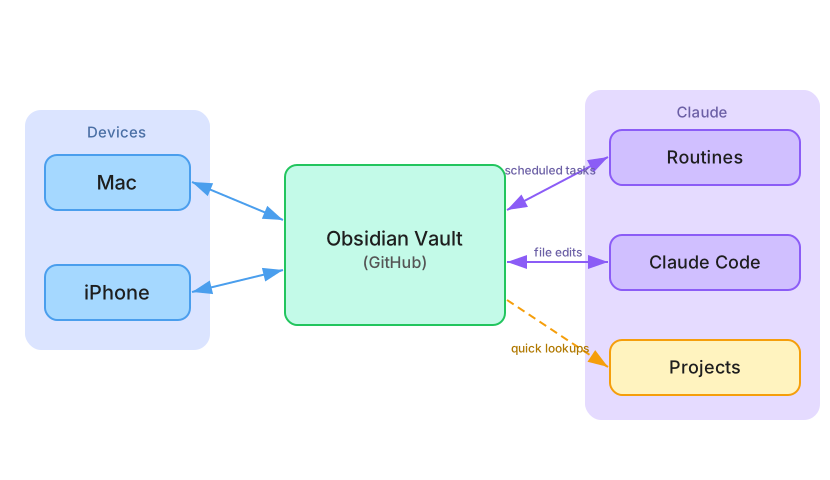
| Routines | Claude Code | Projects | |
|---|---|---|---|
| When | Scheduled, overnight | I want to change or ask something | I have a quick question |
| What | Runs process-inbox, reconcile autonomously | Edits files, runs skills, answers questions | Read-only Q&A against vault knowledge |
| How | Autonomous, no input needed | Interactive, on desktop or mobile | Fast, cheap, conversational |
How does it work?
Now that you know what this setup can do, here’s how it works, so you can build your own. The whole thing runs on three pieces: an instruction file, a folder of skills, and a feedback loop.
The instruction file: CLAUDE.md
Every time the agent starts a session, it reads a single markdown file called CLAUDE.md. This defines the vault’s folder structure, frontmatter schema, privacy rules, what reconcile or other keywords mean and how to handle edge cases.

Skills: 7_Agent/skills/
Skills are modular markdown files that describe a procedure. process-inbox is a skill. reconcile is a skill. Each one is just a markdown document the agent reads when working on a related tasks, which means I can simply edit the agent’s operating manual in Obsidian!
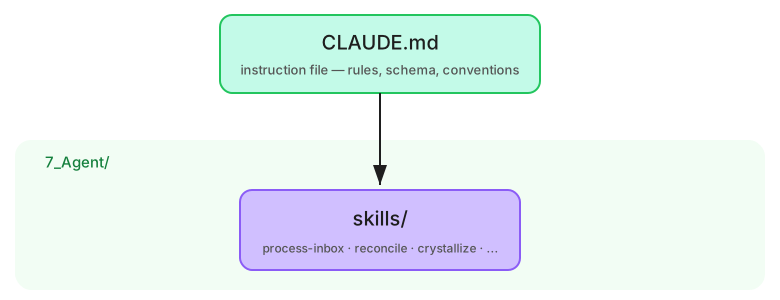
For this to work, you need to symlink
.claude/skills/→7_Agent/skills/so Claude Code picks up the skills from the vault.
Agent files
An agent that starts from scratch every session isn’t very useful. It needs state: what did it do last time, what’s still open, what doesn’t the vault know yet. Three markdown files give it that memory, forming a feedback loop between runs:
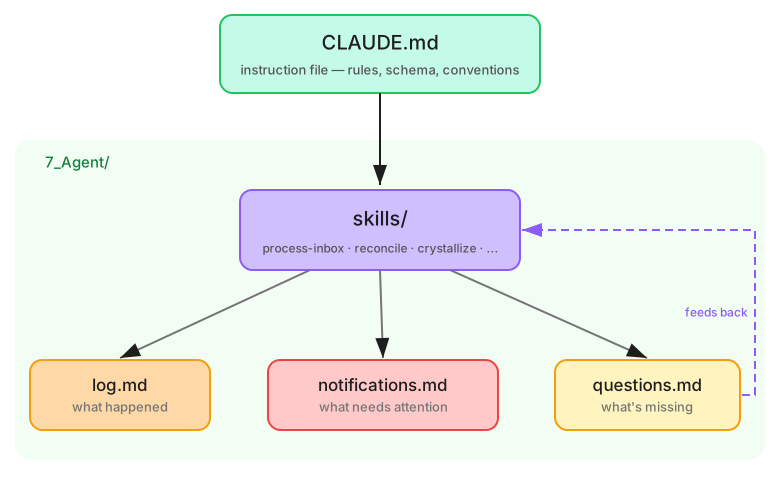
log.mdrecords what happened; every run appends an entry.notifications.mdsurfaces what needs my attention, so the agent can flag things for me asynchronously.questions.mdtracks what the vault doesn’t know yet; when I ask something the agent can’t answer from existing notes, it logs the gap. Next time a related topic comes up, there’s a prompt to actually write that page. This is how the wiki learns what to grow toward.
Git
All of the above requires the vault to be a git repo. Claude Code needs something to clone, routines need a repo to operate on, and Projects needs a GitHub folder to sync knowledge from. The tradeoff is that git is a programmer tool, but with the right plugin it feels like iCloud. I wrote a separate guide: Setting up Git for Obsidian.
Steal this setup
CLAUDE.md is public at CLAUDE.md, the skills are all readable in 7_Agent/skills/. You don’t need my specific skills; you need the pattern: a git-tracked folder of markdown, an instruction file the agent reads on every session, and a handful of skills written as markdown themselves.
For a deeper look at the general architectural pattern behind this setup, see Agent-Native Software Architecture.
Why some pages 404
This vault publishes at alexanderweichart.de via Quartz. Some folders are excluded:
7_Agent/(agent artifacts),6_Private/(personal and work-confidential material),0_Inbox/(unrouted items), and any note withdraft: true. If you hit a dead link, that’s why.